Monday, April 16, 2012

Object Oriented Concepts - An Introduction

Work has been busy for a while. I am finally returning to my blog on PB.
We started looking at PB program as a collection of Objects in the last post. Yes, PB is now an object oriented language, but it sure did not start that way. Sure it has some objects like windows, buttons etc, but does that make it an Object oriented environment automatically? This topic itself is so huge, So, I decided to touch on these first before continuing further with PB.

What  is an Object?

The simplest definition of an object is a thing, a noun or an entity. In the programming world, this has come to mean a self contained programming unit. By hooking different "objects" you can make a program. Objects themselves are not new. Remember the old C programs? When you compile individual C files in a program, they were converted to "object" file. Though it doesn't mean the same, it stands for a program unit. By linking different "object" files, we arrived at the final program (Executable). Then there were modules. Even though there is a subtle difference between a module and an object, in theory they are the building blocks of a program. Remember, COM (Microsoft .Net evolved out of this eventually)? The idea was to have bunch of OLE (eventually called Active-X) that would be glued together in a program. In fact, Visual Basic was invented for such a purpose originally. We will explore more about objects in the coming posts. But, while you are at it, think about another term frequently used in OO: a Class. Several authors allude this to a blueprint, cookie cutter, a mold for creating objects.

What is Object Orientation (OO)?
An object has several other characteristics that makes an object in an Object-oriented language different from earlier definitions of objects. If you Google for the word “Object oriented”, you will find a million links. If you sift through all those, you will come to the following conclusion:
Object Oriented is a new paradigm (though it's been around for 30+ years now) and it is difficult to learn and/or master. Yet you see, every programming language (PHP, Coldfusion, PERL, PYTHON, you name it) out there is joining the OO way. So, if you are going this route, you have to get the concepts right.

Object oriented is many different things to many different people. Even the languages that claim to support OO now, are not fully OO themselves. So, let us discuss fundamental definition of being object oriented. In later posts, we will continue to drill down this topic.
Several books talk about Object Oriented (OO) approach to contain the following four basic characteristics

  • Abstraction

  • Encapsulation

  • Inheritance

  • Polymorphism


We will analyze each of these below.

Abstraction
Almost anything we do with computer software is an abstraction of the real world. An ATM machine is essentially modeled after a real-life teller it came to replace. Abstraction itself is not OO. Cobol and Fortran programs abstracted business models and mathematical models respectively for about 50 years now. But the abstraction in OO, is much closer to the real life. After all, real life is full of objects: people, earth, machines, food, microwaves, books, TV, radio etc.

In OO, we try to call a Radio a radio and define it's properties and operations to emulate real life one (actually a radioObject is more appropriate name for it; of course, it's a software object not a real one, but you could make it to play music!). A software abstraction is context based. For e.g., when we abstract customers, shop owners and employers we are abstracting people. In such an abstraction, we definitely would like to know their names, but we don't need know their race, gender, height, weight etc. Where as, if the person abstracted is a patient, suddenly some of these characteristics matter!

A speedometer in a car is a good example for abstraction. We see the needle to get an idea as to how “fast” or slow the car is going. Abstraction in this case varies between MPH in the US to Kilometers in some other countries. A thermometer, similarly abstracts how "hot" outside temperature is.

Encapsulation
This is the next characteristic of an OO programming environment. Encapsulation, simply means hiding private data and showing proper (public) interface. We don't want to see inner-workings of a microwave or a car when we are using it to heat our pizza or driving to get one. When we shop for a car, we are happy if we find a steering wheel, something that looks like gear, brakes and of course, those 4 wheels that the car needs to “run”. Of course, some of us would like little more glossy finish, but none of these involve putting engines right next to you on the front seat! And of course, the way those engines come pretty well sealed these days, they are very well encapsulated themselves. There is one “interface” you see, the oil cap that lets you fill oil. The content, level of oil, is not immediately visible. If you open and use a dip stick, you can find out the actual level of oil!

Speedometer mentioned above is also a good example of encapsulation. To “see” speed one doesn't need to look at rotating gears, tires, road etc. They just look at the interface called “Speedometer”.

Encapsulation itself is not a new concept. It's been around since the early days of programming. In Pascal, you could achieve certain amount of encapsulation by proper function design. C of course, offered modular programming (file level – see post “Modular progamming in C” for more information).

Inheritance

The most common meaning for this English word is the property (read “Wealth”) inherited from ancestors when they pass on. And it's not just property that can be inherited. We also talk about some characteristics passed on (genetically). It's this latter mean that's adapted in the computer lingo. Inheritance in OO allows an object to acquire properties and behavior of some other. So, we talk of a Dog object inheriting properties of an animal object (actually class, we will discuss these shortly).

Of course, in real life we don't say Dog inherited from Animal. We say, Dog “Is A” animal. We also say Car “has a” engine. And we have access (reference) to computers in the hotel. These are different types of object relationships in OO. An “Is A” is considered to be inheritance. A “Has A” relationship is called composition. And a reference to an object out there, is an Association.

Of these, Composition and Association were possible is non-OO languages as well. Inheritance itself could be indirectly implemented through these 2. For e.g., in C, using plain structures and function pointers we could mimic any of the above relationships.

Polymorphism

This came from a Greek word. Poly means many, morph – form. For e.g., different forms of shapes. Circle, Square, Rectangle and Triangle are all shapes. Of these, Rectangle and Square are similar, in that they both have sides. Circles and Ovals could be similar.

Now, shape is a noun, an object. How about a verb – an action or behavior? Let's take the word “Play”. Try using this English word in sentences and you will see how many different objects can play in how many different ways. Like playing a piano, like playing Football, Playing cards, playing a part in a play, Play with a child, Playing with life! This is truly a polymorphic word. How about the word, “Talk”? “Talk” to a dog, barks, cat meows and the cow moos, not exactly talk in the human sense, but in the sense of “open your mouth and make a sound” it's the same operation, with various forms!

In this post, we tried to explain what OO is and try to understand the terminologies typically related to the OO. This wasn't totally a technical discussion. Now that we got some definitions out of the way, let's get down to business with the topic of Object Oriented. Try to remember some of the examples when we get to our next post.

Below picture summarizes all these terminology as they relate to a Microwave.


Sunday, December 11, 2011

File Checking - Perl to the rescue

One of my coworkers posted about an issue with one of the data files we receive from outside world. We have a batch program that processes these files and posts transactions into our system. The issue was that a file had one record that an extra byte and any amount of checks didn't reveal the "bad" row. After different checks, he decided to download to PC, take it into TextPad and turned on visual spaces to find which row had that extra space.  Very tedious, but it works.

As you may know, Perl is a very good scripting tool for such purposes. I've created a sample perl script that does basic checks from file size to record size. If it finds any discrepancy, it prints the line #s and records. (See sample output below). For those interested, I'm attaching a copy (text version of the script) here for reference.

(If you are uploading to unix, you need to chmod +x to make it executable).

Please let me know, if you want more information. Feel free to change the script as needed (but please send me a copy, so I can keep mine updated).

Sample Usage:

/tmp/chkfile.pl FIN_09022011_131353.txt 259

1st parameter is the file name and the second parm is expected record size.

Sample Output:
$/home/svaradar/dev/perl
$ /tmp/chkfile.pl FIN_999905_BILLPAY_09022011_131353.txt 259
Name of the file              : FIN_09022011_131353.txt
File Size                     : 1554 bytes
Record Size expected          : 259
Total # of lines in file      : 6
File appears to be a DOS file. (contains carriage returns)
All rows match!

After creating a bad record (I just "fixed" one of the record to change it to 260 chars):
$ /tmp/chkfile.pl FIN_09022011_131353.txt 259
Name of the file              : FIN_09022011_131353.txt
File Size                     : 1555 bytes
Record Size expected          : 259
Total # of lines in file      : 6
File appears to be a DOS file. (contains carriage returns)

Following rows were unmatched:
+4 -  Size: 260 - << P0001CHK0000000000000374.4600099999990001400001111              011000015                                                                                     Sample Record                                                                                     <CR>>>


<CR>- The script translates CTRL-M to printable <CR>; otherwise it would have inserted just a blank line in the output!


Below file contains the perl script in PDF file format:

chkfile.pl

Friday, December 9, 2011

Enabling DBTrace in PB

Enabling DB Trace in PB

Powerbuilder has a nice feature to enable trace on a database connection. In a typical PB application this can be enabled by adding a "TRA" (for TRACE) before the DBMS name while setting connection parameters before making connection to the database.
SQLCA.DBMS = "TRACE DBMS_name"
SQLCA.ServerName="<Oracle Server>"
SQLCA.LogPass="<Oracle ID>"
SQLCA.LogPass=<Oracle Password>"

Trace can be abbreviated as TRA. In this example, the prefixing is done in Powerscript. SQLCA is the transaction object that is used in Powerscript to connect to database. In a typical application, however, these settings are read from an ini file or the Windows Registry. So depending on the design, you may have to add TRA to an .ini file or the Registry setting for the Application.

To disable the Trace, just remove TRA and restart application.

Enabling DB Trace in EA Server

I currently work with an n-tier PB application deployed in EA Server. The database connection happens only on the Server side. (It's still in PB code, but the PB code runs inside EA Server). So, it is slightly different from the traditional 2-tier PB application.

Typically in any EA Server application, connections to the database are made through Connection Caches (DB Pool). So, we can set the DB trace while connecting to the Connection Cache.

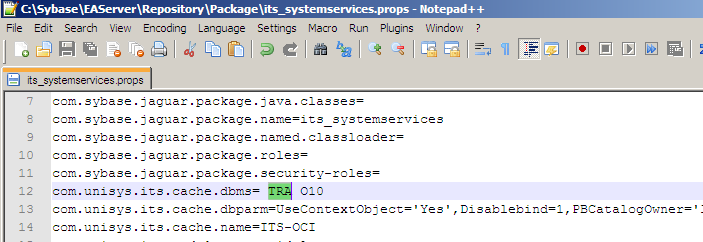
In our application, we have a package called its_systemservices that has some global service objects, including a Properties Manager component. We use this component to store and get all the system level settings, including the settings required by the connection Cache(s). The actual settings are stored as properties of the its_systemservices package. One of these settings is the DBMS property which is set to O10 (for Oracle 10g driver). By prefixing this with TRA(ce), we can enable the DB Trace.

In EA Server, every entity has a set of properties which are stored in a properties file for the entity. We can edit these properties in Jaguar Manager.

Package Properties_ its_systemservices

The above change gets saved in the properties file for the package (its_systemservices.props). Alternatively, you can also edit the file directly. But, be careful not to change any other settings.

Sybase_EAServer_Repository_Package_its_systemservices

To disable, just remove TRA and restart EA Server.

DB Trace File

By default, the trace output will be stored in a file called, dbtrace.log in C:\Windows. It has lots of valuable information including the SQLs that were executed. To capture all the SQLs from a PB screen in our application, I run EA Server in local mode and thus I will be able to capture SQLs from all the Server components.

PB appends to this file for every DB call and thus file becomes fairly large quickly. Do not forget to turn off this setting as soon as you got the trace needed, as the trace files are typically large. The file can be deleted at any time (provided it's not locked by the app) and PB will create a new file (If TRA option is still set).

DB Trace file name, location and what is being captured can be controlled. Previously, you can control the trace file name and location by setting it in PB.ini. With newer versions of PB (since PB 10.2), you can edit the registry to do this. For e.g., in PB 10.5, the following registry entry controls DB Trace.
HKEY_CURRENT_USER\Software\Sybase\PowerBuilder\10.5\DBTrace

Apart from being able to change file name and location, you can also turn tracing on/off dynamically using these settings. We can also control how much trace information is captured by setting appropriate trace settings under DBTrace in the registry.

Veteran PB developer, Bruce Armstrong, has an article on this nice feature here.

Note: This setting is only for capturing SQLs coming from PB objects (Datawindows, Embedded SQL etc) Obviously, SQLs in Database (such as those in Stored procedures etc) will not be in this trace file, but the calls to Stored procedures will be.

PB Gotcha - Embedded (inline) SQL - SELECT..INTO


Just a quick gotcha I stumbled on in PB code. This is about SELECT..INTO. As you know, SELECT..INTO expects one row and it works well as long as there is only one row.While researching another issue, I saw the below SQL in one of the objects in our application.

of_get_cutoffdate
....

 //
Date ld_CutOff
....
SELECT TO_DATE ( PARM_VALUE , 'DD-MON' )
INTO :ld_Cutoff
FROM SYSPARM
WHERE TRIM ( PARM_NAME ) ='CUTOFF_DATE';
....


There are 4 rows for this parameter in the SYSPARM table. I originally anticipated ld_Cutoff to be NULL (or 01/01/1900 - default for date) as I thought this SQL will error out because of too many rows. To my surprise, the variable had the value from the first row.

The gotcha here is that PB does not throw any exception when a DB error occurs. Even though the above SQL resulted in an error, PB silently fetches the first row's value into the variable and sets SQLCODE to -1 and error message in SQLErrText. (See attachment). 

Even though the host variable got value from 1st row, this is not guaranteed and is not a documented feature in PB or Oracle. If we anticipate more than 1 row for the SELECT, then try to add conditions (rownum, cursors) to filter to 1 row.

(Oracle SQL[PL/SQL] behavior: In Oracle the same SQL would generate a TOO_MANY_ROWS exception . There also the SQL seems to be setting the host variable with the value from the 1st row, but Oracle does not recommend relying on this. See usage notes in reference 1 below)

Irrespective of the # of rows fetched,  we always need to add proper error checks around the SQL. In PB, check the SQLCA.SQLCode, and print messages using SQLCA.SQLErrText. (In Oracle, handle TOO_MANY_ROWS exception).

Note: A lot of our SQLs getting SYSPARM are done this way. PR4297 was created to add corrections to these.

Reference:
1. Oracle PL/SQL User Guide

Visual Expert survey on Powerbuilder

If you are interested in knowing where PB stands out there, there is a survey on PB here:

http://www.visual-expert.com/EN/survey-pb-stored-procedure-sybase-mssql/survey-powerbuilder-2011-us.php

This is the company that makes Visual Expert for PB, we saw earlier. If you take the survey, they let you see their survey results for previous years.


Forward Slash in SQL*Plus

Note to the visitor: Thank you for stopping by. I see a lot of people trying to find out about forward slash in SQL*Plus. I want to clarify: This post only applies to Oracle SQL. If you are you are querying about a "/" usage in any other database, you are in the wrong place.

Forward Slash ("/") in Oracle SQL

This post is about using forward slash ("/") in Oracle SQL and PL/SQL. This gets a lot of developers (new and experienced alike) as it's not always needed and sometimes it shouldn't be used.

Have you ever tried typing "/" (without quotes), as soon as you logged into SQL*Plus? Try it. You will see something like below.
SQL> /
SP2-0103: Nothing in SQL buffer to run.
SQL>

The above snippet explains it all pretty well. Forward slash ("/" ) is a shortcut for RUN command in SQL*Plus (like "go" in SqlServer or mysql). Since there is nothing to run yet, SQL*Plus returned an error message (prefixed with SP2-).

The message in the above example also shows there is a SQL buffer in SQL*Plus. Any SQL sent to DB ends up in this (one statement) buffer. Also, if there is a statement in the buffer, "/" would have simply re-executed it.

When you type a line and press ENTER, SQL*Plus checks if it's one of it's own commands, a SQL statement or just bad text. If it's a SQL (identified by keywords like SELECT etc), it starts storing it in the buffer until it sees a "/" or a semi-colon, at which time it executes it (actually sends it to the server to execute it).

Gotcha with Forward Slash (/)

SQL Statements typically end in Semi-colon. Semi-colon is the Statement Terminator in ANSI standard. But, in Oracle SQL, you can use "/" to run a SQL, instead of semicolon, like shown. (This is how SPANISH record got inserted in my attached example at the bottom of this post).
SQL> SELECT dummy FROM dual
2 /
Dummy
-----
X

But, here is the gotcha: If the statement itself contained a semi-colon, then "/" would have re-executed it!!!!
SQL> select dummy from dual;
Dummy
-----
X
SQL> /
DUMMY
----------
X

Oops. Imagine this was an INSERT statement instead!!! (And this is what happened in my example script attached. If you notice the "/" before commit, this is what caused FRENCH to be inserted twice!!).

So be careful with your usage of "/". For plain SQL, it's a matter of choice. Typically, this is used in DDL statements and semi-colons in DML statements. Be consistent to avoid surprises.

Remember "/" is just a RUN (or push) command in the tool, not part of Oracle SQL itself. If you run my attached example script in SQLTools, you will get an error on "/".

Always, run your scripts in SQL*Plus to make sure it will run fine in production, as this is a tool of choice for several DBAs.

Forward Slash ("/") in PL/SQL

PL/SQL on the other hand is a group of SQL statements with embedded semicolons. In this case, a semicolon alone cannot be used to send to DB. It needs a push with "/"! So, in this case, it acts as a Statement Terminator as well.
SQL> list
1 DECLARE
2 x NUMBER;
3 BEGIN
4 SELECT 10 as num INTO x FROM dual;
5 Dbms_Output.put_line('x = ' || x);
6
7 END;
8
9
10
11
12
13*
SQL>

In the above example, Notice lines  7 - 13 are blank. This is because I pressed ENTER several times. Since SQL*Plus knows this a PL/SQL (declare, begin...end), it waits for me to signal the real end, which is..... a "/". Until I typed "/" on line 13, it didn't come out of the PL/SQL editing mode. "/" also pushed the PL/SQL block to server to execute it.

Even though this has a bunch of lines, this whole text is a single PL/SQL statement. Type list at the SQL*Plus Prompt. You will see the "single" statement listed in full (minus the "/").

SQL*Plus commands

SQL*Plus commands like SET, SHOW, SPOOL etc are typically one liners and should not be ended with semicolon (and don't need "/" either).
SQL> show serveroutput;
serveroutput OFF
SQL>

These commands will be executed locally in the tool and won't be stored in SQL buffer. So, a "/" after a SQL*Plus command will not re-execute it. In fact, it will re-execute the previous SQL Statement in the buffer!!

(Note: A "/" must be the first non-whitespace character (space, tab etc) on a line by itself. It cannot be at the end of a line, like semi-colon can be).

I've also posted a more detailed description of SQL*Plus here.

Notes

  1. There is a subtle difference: RUN actually lists before it runs; / doesn't!

  2. This is a local message from SQL*Plus. If this was from Oracle database server, you would see a "ORA" prefix.


Example Script
-- Example data for SQL*Plus related blogs
DROP TABLE greetings;
CREATE TABLE greetings (id NUMBER, lang VARCHAR2(10), msg VARCHAR2(30));
INSERT INTO greetings VALUES (1, 'ENGLISH', 'Hello World');
INSERT INTO greetings VALUES (2, 'FRENCH', 'Bonjour le monde');
/
INSERT INTO greetings VALUES (3, 'GERMAN', 'Hallo Welt');
list
/
INSERT INTO greetings VALUES (4, 'SPANISH', 'Hola Mundo')
/
COMMIT;
-- Here are some extra notes about this script:
-- Just Hello world in some languages. Translations are approx. from Google.
-- Even though we are submitting this script to SQL*Plus entirely,
--   it executes one SQL Statement at a time. List command shows this.

-- Forward Slash after FRENCH, reexecutes previous command. so you will see
-- 2 FRENCH records inserted.
-- Forward Slash after GERMAN was, by mistake, thought to run list, but instead it
-- it ran the previous SQL statement, thus we have 2 GERMANs!!
-- Forward Slash after SPANISH inserts only once - because it's missing semi-colon (;)
-- and / substitutes for it!!
-- Commit is required in Oracle SQL. By default, Autocommit is not turned on in SQL*Plus
-- To see/set default use SHOW/SET AUTOCOMMIT

Further Reading


  • See my Take 2 on this topic here.

  • If you are looking for any relationship between forward slash and commits (there is none), please see my post here.

  • If you are looking to see if Forward Slash somehow affects DDLs, please see here.

  •  Please see here for a more detailed description of SQL*Plus in general.


References

SQL BNF Grammars

  1. http://savage.net.au/SQL/sql-92.bnf.html

  2. http://www.contrib.andrew.cmu.edu/~shadow/sql/sql2bnf.aug92.txt

  3. http://www.contrib.andrew.cmu.edu/~shadow/sql/sql1992.txt

Oracle SQL Gotcha - Commit in DDL

This happened to one of my fellow developers recently. She had an ALTER statement in the middle of a SQL script that produced an unexpected results when the SQL failed. The problem was mixing DMLs with DDLs in the same script. Read on!

As you probably know, Commits work differently in DMLs and DDLs in Oracle.

  • Typically* DML statements (like INSERT, UPDATE, MERGE, DELETE...) needs an explicit COMMIT statement to commit changes to DB.


  • DDL statements (like CREATE, CREATE TABLE AS (CTAS), DROP, TRUNCATE etc) don't require a COMMIT statement. DDL actually issues an implicit COMMIT before and after the statement is executed.  This also means, any COMMIT statement after a DDL is not required and has no effect.


So, if you are mixing DMLs and DDLs, be mindful of this. If you have a DML (insert/update...) statement, followed by a DDL statement, you might have inadvertently committed earlier DML. Any later rollbacks won't have any effect.

Here is an example. Test 1 doesn't mix DMLs and DDLs. (There is no DDL immediately after DML). Test 2 on the other hand has a bug in that it has a DDL after the DML statement which results in unpredictable results.

The gotcha here is that, since the commit is done implicitly before even the DDL is executed, this happens even if the DDL failed!! 

Test 1 -- to show the effect of rollback after a DML
-- 1. DDLs 
DROP TABLE test_commit;
CREATE TABLE test_commit (id int, name VARCHAR2(30));

-- 2. DML
INSERT INTO test_commit VALUES(1, 'Test 1');
-- this shows 1 row
SELECT * FROM test_commit;

-- 3. Rollback below reverses the inserts (no DDLs since last DML)
ROLLBACK;

-- 4. This shows no rows
SELECT * FROM test_commit;

Test 2 - show the effect of an interspersed DDL on commit!
-- 1. DDLs
DROP TABLE test_commit;
CREATE TABLE test_commit (id int, name VARCHAR2(30));

-- 2. DML
INSERT INTO test_commit VALUES(1, 'Test 1');
-- This shows 1 row
SELECT * FROM test_commit;

-- 2a. This DDL implicitly commits, so above insert is now committed.
DROP TABLE temp_table2;

-- temp_table2 doesn't really exist - I just used it to show it really doesn't matter,
-- commit happens implicitly in the DDL

-- 3. This rollback is same as in Example 1, but this has no effect
ROLLBACK;

-- 4. his shows 1 row; if the rollback above worked, we wouldn't see any rows here.
SELECT * FROM test_commit;

-- End of Test; cleanup
DROP TABLE test_commit;

Notes:
* When Autocommit is off, which is the default in Oracle