Oracle 11g has several enhancements over the previous versions. Some of these changes are in the client tools like SQL*Plus. To be able to use these you actually need to upgrade the client tools as well. If you are using old clients like me (I use Oracle 10g SQL*Plus), then you won't see those changes in Oracle 11g. For e.g., the EXITCOMMIT option I mentioned in my earlier post cannot be used in my scripts!
(I couldn't upgrade my client because we use Powerbuilder 10.2 with EA Server 5.5 which doesn't support Oracle 11g drivers. So, until we upgrade those tools, we are stuck with 10g client!)
Showing posts with label Powerbuilder. Show all posts
Showing posts with label Powerbuilder. Show all posts
Tuesday, June 18, 2013

Thursday, June 13, 2013
Gotcha: PB Deployment - SYSTEM var not supported error
When you work on code deployed to n-tier, you have to be little more careful while defining the interface for the objects. An n-tier application typically runs in an heterogeneous environment, meaning objects in different languages/platforms may talk to each other through a common interface. If you are not careful, your object may end up being passed to the wrong tier that doesn't know how to interpret it. You have to make sure the data types of the interface functions exist on all sides. Otherwise, you will get unexpected errors at compile or run time.
This is true for PB also, if you are deploying your code to EA Server. Mixing system objects and types in the object's interface will cause errors while deploying to EA Server as shown below.
[caption id="attachment_5001" align="aligncenter" width="536"] 1. CORBA IDL Error on PB System objects[/caption]
While deploying this project (p_d_adm_roles_lh) to EA Server, PB throws the following error message:
Here is what Sybase document says:
Deployment error or warning (from PowerBuilder): SYSTEM variables not supported
References:
http://infocenter.sybase.com/help/index.jsp?topic=/com.sybase.help.eas_5.2.eastg/html/eastg/CDDDGIFJ.htm
http://www.omg.org/gettingstarted/omg_idl.htm#TypeSystem
http://www.ibm.com/developerworks/webservices/library/co-corbajct3.html
http://documentation.progress.com/output/Iona/orbix/gen3/33/html/orbix33java_pguide/IDL.html
http://www-cdfonline.fnal.gov/daq/CORBAXXX/tutorial.html
http://docs.oracle.com/cd/E13203_01/tuxedo/tux80/cref/member.htm#1120423
http://www-itec.uni-klu.ac.at/~harald/corba/idldatattypes.html
http://www.slideshare.net/arnoldindia/corba-idl
This is true for PB also, if you are deploying your code to EA Server. Mixing system objects and types in the object's interface will cause errors while deploying to EA Server as shown below.
[caption id="attachment_5001" align="aligncenter" width="536"]
1. CORBA IDL Error on PB System objects[/caption]While deploying this project (p_d_adm_roles_lh) to EA Server, PB throws the following error message:
 ---------- Deploy: Deploy of p_d_its_adm_roles_lh
Doing Incremental Rebuild...
Generating IDL for Selected Components...
Generation Messages:
    Deployment Warning: SYSTEM Variables Not Supported.   The following bypassed for component 'im_adm_roles_impl':    n_txn
    Deployment Warning: SYSTEM Variables Not Supported.   The following bypassed for component 'im_adm_roles_impl':    n_txn
 ---------- Finished Deploy of p_d_its_adm_roles_lh
Here is what Sybase document says:
Deployment error or warning (from PowerBuilder): SYSTEM variables not supported
Public instance variables and arguments to public functions can be any of: Standard datatypes, Structures, Custom class user objects that have been deployed as EAServer components, ResultSets.
If you are using system datatypes (transaction, data store, and so on) as instance variables, declare them as protected or private. If you are using system datatypes as function arguments, declare the function as protected or private.
The real problem was in the CORBA interface. I declared a public instance variable called n_txn of type Transaction which is known to PB but not to CORBA IDL (interface definition language). So, this cannot be in the public interface of the object. CORBA IDL only allows types that can be mapped to it's own. User defined objects are allowed, as long as they themselves are composed of simple types that IDL allows. More on these in a separate post.
While deploying a component to EA Server, PB generates IDL and related proxy and stubs/skeletons for the CORBA interface. It checks to make sure generated IDL complies with the rules of IDL definitions. In the above example since PB's Transaction object cannot be mapped to any IDL type, PB prevents deployment and throws the error. Thus avoiding surprises at runtime.
Ideal solution is to avoid non-standard types in the instance/shared variables in objects to be deployed to n-tier. But, if you really have to define instance/shared variables of types that are not translatable to IDL, then make them private or protected. IDL interface is generated only for the public attributes and methods.
References:
http://infocenter.sybase.com/help/index.jsp?topic=/com.sybase.help.eas_5.2.eastg/html/eastg/CDDDGIFJ.htm
http://www.omg.org/gettingstarted/omg_idl.htm#TypeSystem
http://www.ibm.com/developerworks/webservices/library/co-corbajct3.html
http://documentation.progress.com/output/Iona/orbix/gen3/33/html/orbix33java_pguide/IDL.html
http://www-cdfonline.fnal.gov/daq/CORBAXXX/tutorial.html
http://docs.oracle.com/cd/E13203_01/tuxedo/tux80/cref/member.htm#1120423
http://www-itec.uni-klu.ac.at/~harald/corba/idldatattypes.html
http://www.slideshare.net/arnoldindia/corba-idl
Friday, May 31, 2013
Quick Tip - Oracle 11g Instant Client
Oracle 11g has 2 versions of clients, Instant Client which has minimum required files for connecting to Oracle and the full blown (thick?) client which has many drivers and tools like SQL*Plus etc. The full blown version seems to be more for the developer and the instant client seems to be suitable for end users.
Recently, we upgraded to Oracle 11g database. When our desktop admin made changes to a user's PC to connect to our 11g database, one of the applications (in VB) stopped working. Incidentally, he had only installed Oracle instant client for end users, as it uses less space.
The VB application in question actually used OleDB to connect to Oracle. Apparently, the instant client we installed for this user did not include OleDB related files. This is why the connection failed. To make it work, we did the following:
1. Installed Instant Client for Oracle 11g (32bit) (option 1 during installation)
2. After the install we copied the OraOLEDB.dll files into the %ORACLE_HOME%\bin directory and registered it. (using regsvr32).
3. Created the directory C:\Oracle11g\Network\Admin and move over the tnsname.ora. (By default tnsnames.ora is left in Oracle11g folder. If you don't move the file, you need to add/change TNS_ADMIN environment variable to point to the right directory.)
Once we did this, the VB application was able to connect to Oracle 11g through OleDB.
Note:
1. This is the minimum required client installation for Oracle. We didn't install the full blown client, as it comes with SQL*Plus etc which the end user doesn't need.
2. All the data access drivers are bundled in an optional package called ODAC. We didn't want to install all the drivers for the user. So, copied only OleDB driver from here.
3. Apparently, SQL*Plus can be added on to instant client as well. See here for more information about Oracle instant Client. Question about connection strings has a hint for connection problems similar to ours.
Reference:
http://www.oracle.com/technetwork/database/features/instant-client/index.html
http://www.oracle.com/technetwork/database/features/oci/ic-faq-094177.html
http://www.oracle.com/technetwork/topics/dotnet/downloads/index.html
http://support.dundas.com/Dashboard4.Installing_the_Oracle_Data_Provider_for_dot_NET.ashx
Recently, we upgraded to Oracle 11g database. When our desktop admin made changes to a user's PC to connect to our 11g database, one of the applications (in VB) stopped working. Incidentally, he had only installed Oracle instant client for end users, as it uses less space.
The VB application in question actually used OleDB to connect to Oracle. Apparently, the instant client we installed for this user did not include OleDB related files. This is why the connection failed. To make it work, we did the following:
1. Installed Instant Client for Oracle 11g (32bit) (option 1 during installation)
2. After the install we copied the OraOLEDB.dll files into the %ORACLE_HOME%\bin directory and registered it. (using regsvr32).
3. Created the directory C:\Oracle11g\Network\Admin and move over the tnsname.ora. (By default tnsnames.ora is left in Oracle11g folder. If you don't move the file, you need to add/change TNS_ADMIN environment variable to point to the right directory.)
Once we did this, the VB application was able to connect to Oracle 11g through OleDB.
Note:
1. This is the minimum required client installation for Oracle. We didn't install the full blown client, as it comes with SQL*Plus etc which the end user doesn't need.
2. All the data access drivers are bundled in an optional package called ODAC. We didn't want to install all the drivers for the user. So, copied only OleDB driver from here.
3. Apparently, SQL*Plus can be added on to instant client as well. See here for more information about Oracle instant Client. Question about connection strings has a hint for connection problems similar to ours.
Reference:
http://www.oracle.com/technetwork/database/features/instant-client/index.html
http://www.oracle.com/technetwork/database/features/oci/ic-faq-094177.html
http://www.oracle.com/technetwork/topics/dotnet/downloads/index.html
http://support.dundas.com/Dashboard4.Installing_the_Oracle_Data_Provider_for_dot_NET.ashx
Monday, April 15, 2013
Oracle SQL - UNION ALL
Here is another TechTarget article about Oracle SQL. This time about using UNION ALL to combine results of 2 SQLs to sort numbers.
Sunday, January 6, 2013
Gotcha: EA Server config. XML file comments
Sybase EA Server (Ver 5.5) provides 2 interfaces for the admin to work with the Server and the Repository. Sybase Jaguar Manager is the GUI interface, that one can use to manage the Server and the repositories.
Jagtool is the command line equivalent of the above manager. There are a lot of things you can do in Jagtool and with host scripting (batch files in windows), you can make real powerful scripts to execute these in batch mode.
EA Server typically configures all elements using properties files. But, it also allows us to use XML files to configure the server. These are available at various levels such as Server, Package, Component, Connection Cache etc.
This gotcha is about writing comments in an XML file meant for configuring EA Server. Single line comments follow the XML/HTML standard.
When you write multiline comment, make sure the tags are on their own line, thus:
If you include any text in the first line, it will error out.
Note: You only need <!-- to mark the beginning of a comment; I doubled exclamation mark to avoid losing the comment line in view!! Otherwise, Wordpress HTML processor would have hidden it from view.
Jagtool is the command line equivalent of the above manager. There are a lot of things you can do in Jagtool and with host scripting (batch files in windows), you can make real powerful scripts to execute these in batch mode.
EA Server typically configures all elements using properties files. But, it also allows us to use XML files to configure the server. These are available at various levels such as Server, Package, Component, Connection Cache etc.
This gotcha is about writing comments in an XML file meant for configuring EA Server. Single line comments follow the XML/HTML standard.
<!!-- this is a single line comment -->
When you write multiline comment, make sure the tags are on their own line, thus:
<!!--
This is a
multi-line
comment
-->
If you include any text in the first line, it will error out.
Note: You only need <!-- to mark the beginning of a comment; I doubled exclamation mark to avoid losing the comment line in view!! Otherwise, Wordpress HTML processor would have hidden it from view.
Sunday, December 23, 2012
Software State of affairs - Maintaining OO
Last week, a friend at work was analysing code in Powerbuilder and question came up about function Overloading and we branched into Object Orientation in general. That question got me thinking. Though Object oriented programming has been around for a while, the concepts of OO are not completely understood or followed.
I posted about OO concepts here earlier. To do that I bought and read several books, sifted through the web a lot. There were so much confusion and conflicting ideas. Most of those books use obvious objects like animals, people etc in explaining OO concepts that what we learn in those is not enough to translate in to real life OO programming. I mentioned about some of these problems in my earlier post. More and more languages are adding OO concepts, yet people who are used to traditional (procedural) way of programming, struggle to adapt to it or even completely reject it. Often times, Syntax comes in the way of understanding. For e.g., Java borrowed so much from C, C++, that it's often considered to be just enhanced C, thus OO nature of it is completely ignored. And even if these developers switch to OO eventually, the objects they come up with are just repackaged C code, thus perpetuating the problem!
The application I currently support was written in Powerbuilder using a framework called EAF. The software also has business framework that is built around this, definitely a good extensible architecture. Yet, the software has degenerated over the years. Part of the problem is lack of understanding of the framework and/or OO concepts in general. I remember, when I started here, this framework was considered to be the main reason for all evil in the software! There was not enough documentation about proper framework usage, thus it was easy to blame it!
When new developers came in, they wrote and rewrote functions and objects that completely ignored underlying framework thus code is bloated. Further, supporting business has been utmost priority, so such technical issues were completely ignored. I feel, every maintenance project should include the maintenance of the software itself - in addressing technical issues and retuning it to keep it running good, like we do with our cars. After all, business will eventually be affected, if we didn't take care of such technical issues in time! The very first problem I solved in this software was a technical issue - there was a memory leak (due to improper handling of Object pooling) in the software that kept crashing the server during peak usage in the prior years. Business of collecting taxes, was indeed affected during those crashes. And I cannot imagine how much time, effort and resources were wasted during those times.
Another problem I see in software maintenance, is the tendency to solve code smells and code bloats by adding more resources - more servers, more disk space, more memory. When a car runs sluggish, we can't solve it by just adding more engines or more tires, can we? Why is it OK with software? Prior solution to the memory leak problem I mentioned above, was to add more servers and a script to automate the Server Restarts! Once the memory leak was fixed, no more frequent crashes!!!
To curb some of the issues in the application, I recommended and started on a project to re-factor some of the code in the application earlier this year. Main goal was to improve performance in our web application, but I wanted to clean up and reintroduce some of the framework methodologies. Though there was some push back initially, other developers started buying into the idea. Yet, I see the reluctance to change existing ways; after all the software works during normal (low?) usage and business is OK (if not happy), why change those? When I first introduced log4J (logging libraries for Java) for logging in our JSP pages, it took the team at least couple of months to buy into the idea, in spite of me showing stats to support the change.
Our application architecture uses EA Server (EAS) as the middle tier. EAS supports Java and Powerbuilder objects naturally.While Powerbuilder is great for developing applications quickly, Java was used for any multi-threaded activities such as caching and logging etc. We even have Java Stored procedures running inside Oracle database! I recently introduced tools like Eclipse, Ant etc. to streamline Java development activities. With such exposure and addition of new Java packages prompted a team member to say to the effect "we are becoming a Java shop whether we like it or not". I've tried to explain in vain that it was all there before and why we even need them!!
Part of the problem is also lack of career planning and/or training. I remember the days when companies invested in training employees to keep up with the industry trends. Now, we seem to be spending more in buying those extra servers to support more memory leaks :)
I posted about OO concepts here earlier. To do that I bought and read several books, sifted through the web a lot. There were so much confusion and conflicting ideas. Most of those books use obvious objects like animals, people etc in explaining OO concepts that what we learn in those is not enough to translate in to real life OO programming. I mentioned about some of these problems in my earlier post. More and more languages are adding OO concepts, yet people who are used to traditional (procedural) way of programming, struggle to adapt to it or even completely reject it. Often times, Syntax comes in the way of understanding. For e.g., Java borrowed so much from C, C++, that it's often considered to be just enhanced C, thus OO nature of it is completely ignored. And even if these developers switch to OO eventually, the objects they come up with are just repackaged C code, thus perpetuating the problem!
The application I currently support was written in Powerbuilder using a framework called EAF. The software also has business framework that is built around this, definitely a good extensible architecture. Yet, the software has degenerated over the years. Part of the problem is lack of understanding of the framework and/or OO concepts in general. I remember, when I started here, this framework was considered to be the main reason for all evil in the software! There was not enough documentation about proper framework usage, thus it was easy to blame it!
When new developers came in, they wrote and rewrote functions and objects that completely ignored underlying framework thus code is bloated. Further, supporting business has been utmost priority, so such technical issues were completely ignored. I feel, every maintenance project should include the maintenance of the software itself - in addressing technical issues and retuning it to keep it running good, like we do with our cars. After all, business will eventually be affected, if we didn't take care of such technical issues in time! The very first problem I solved in this software was a technical issue - there was a memory leak (due to improper handling of Object pooling) in the software that kept crashing the server during peak usage in the prior years. Business of collecting taxes, was indeed affected during those crashes. And I cannot imagine how much time, effort and resources were wasted during those times.
Another problem I see in software maintenance, is the tendency to solve code smells and code bloats by adding more resources - more servers, more disk space, more memory. When a car runs sluggish, we can't solve it by just adding more engines or more tires, can we? Why is it OK with software? Prior solution to the memory leak problem I mentioned above, was to add more servers and a script to automate the Server Restarts! Once the memory leak was fixed, no more frequent crashes!!!
To curb some of the issues in the application, I recommended and started on a project to re-factor some of the code in the application earlier this year. Main goal was to improve performance in our web application, but I wanted to clean up and reintroduce some of the framework methodologies. Though there was some push back initially, other developers started buying into the idea. Yet, I see the reluctance to change existing ways; after all the software works during normal (low?) usage and business is OK (if not happy), why change those? When I first introduced log4J (logging libraries for Java) for logging in our JSP pages, it took the team at least couple of months to buy into the idea, in spite of me showing stats to support the change.
Our application architecture uses EA Server (EAS) as the middle tier. EAS supports Java and Powerbuilder objects naturally.While Powerbuilder is great for developing applications quickly, Java was used for any multi-threaded activities such as caching and logging etc. We even have Java Stored procedures running inside Oracle database! I recently introduced tools like Eclipse, Ant etc. to streamline Java development activities. With such exposure and addition of new Java packages prompted a team member to say to the effect "we are becoming a Java shop whether we like it or not". I've tried to explain in vain that it was all there before and why we even need them!!
Part of the problem is also lack of career planning and/or training. I remember the days when companies invested in training employees to keep up with the industry trends. Now, we seem to be spending more in buying those extra servers to support more memory leaks :)
Sunday, November 18, 2012
Powerbuilder and SAP
As I mentioned in my earlier post Sybase's merger with SAP seems to be complete. Since SAP took over, there was some uncertainty in the developer community about their interest in keeping the tool alive. From various posts online so far, SAP seems to committed to developing PB further.
If you haven't already noticed, Powerbuilder (PB) is definitely making a come back (among those who left it in the late 90's and the new developers trying to explore PB). I see lot more interest in the tool and many more blogs like this are coming up on the subject. This is almost like before Sybase took over in late 90's. While Sybase kept the product alive, there was a dormant period where the product lost community following. With SAP in the picture, there seems to be renewed interest in PB. They are constantly adding resources related to PB on their site.
http://www.youtube.com/user/saptechnology/videos?query=PowerBuilder
(Courtesy: Bruce Armstrong)
If you are new to PB, these videos may be helpful. I will be posting more links here later.
If you haven't already noticed, Powerbuilder (PB) is definitely making a come back (among those who left it in the late 90's and the new developers trying to explore PB). I see lot more interest in the tool and many more blogs like this are coming up on the subject. This is almost like before Sybase took over in late 90's. While Sybase kept the product alive, there was a dormant period where the product lost community following. With SAP in the picture, there seems to be renewed interest in PB. They are constantly adding resources related to PB on their site.
http://www.youtube.com/user/saptechnology/videos?query=PowerBuilder
(Courtesy: Bruce Armstrong)
If you are new to PB, these videos may be helpful. I will be posting more links here later.
Thursday, November 15, 2012
Gotcha - JMeter: Response Data Display
This Gotcha is about the Load Testing tool called JMeter. JMeter is a real nice open source tool from Apache to load test Web Apps. You can set it up as a proxy and capture web pages and then customize the scripts in the GUI to build powerful Load testing scripts. I will be posting more about JMeter in separate post(s) later.
For those who are familiar with JMeter, this tip may be helpful. When you look at the results in a "View Results Tree" (See image below), the Response Data typically comes out as Text (HTML source). I was looking at these text HTML for a bit, baffled what to make out of it. I recently (accidentally) found out that you can change that. There is a drop-down below the tree (list) of pages visited. This is normally defaulted to "TEXT". If you change it to "HTML" or "HTML (download resources)", then bingo! the HTML page is displayed. "HTML(download resources)" downloads images etc, so the page looks much more like the original web page. There are other options like XML etc.
This choice (drop-down) is kind of away from the response view, so I didn't pay attention to it. Moral of the story is to click on every buttons and drop-downs on a GUI!! (or read the documentation fully!)
[caption id="attachment_616" align="alignright" width="1024"] JMeter Response View Gotcha[/caption]
For those who are familiar with JMeter, this tip may be helpful. When you look at the results in a "View Results Tree" (See image below), the Response Data typically comes out as Text (HTML source). I was looking at these text HTML for a bit, baffled what to make out of it. I recently (accidentally) found out that you can change that. There is a drop-down below the tree (list) of pages visited. This is normally defaulted to "TEXT". If you change it to "HTML" or "HTML (download resources)", then bingo! the HTML page is displayed. "HTML(download resources)" downloads images etc, so the page looks much more like the original web page. There are other options like XML etc.
This choice (drop-down) is kind of away from the response view, so I didn't pay attention to it. Moral of the story is to click on every buttons and drop-downs on a GUI!! (or read the documentation fully!)
[caption id="attachment_616" align="alignright" width="1024"]
 JMeter Response View Gotcha[/caption]
PB developer Center on SAP site
Sybase merger with SAP seems to be complete now. If you didn't already hear the news, John Chen, Sybase CEO, has already stepped down. So, expect more activities to move to the SAP side of things. So far, SAP seems committed to PB.
As part of the migration, they are integrating Sybase news groups into SAP Developer Community Center. Below is the link for PB.
http://scn.sap.com/community/developer-center/powerbuilder
forums on EA Server continues to be on Sybase site through this month and later will be merged into SAP forums as well. See here for more details.
As part of the migration, they are integrating Sybase news groups into SAP Developer Community Center. Below is the link for PB.
http://scn.sap.com/community/developer-center/powerbuilder
forums on EA Server continues to be on Sybase site through this month and later will be merged into SAP forums as well. See here for more details.
Saturday, October 20, 2012
Quick Tip - EA Server: Reset Jagadmin password
This is a really quick tip on how to reset password for the administrator id "jagadmin" used in EA Server. We use this id for everything from running it in Development to production environment, only difference being in DEV we don't have a password for the id, to make it easier to move from machine to machine.
By default there is no password for the jagadmin id. The problem is, once you set a password, you cannot reset the password directly. The tools Jaguar manager (GUI) and the Jagtool (command line version) don't allow you to reset password "for security reasons". After I googled a bit, I found a way.
Surprisingly, all you have to do, to reset the password is to remove the line that has the below setting in the file called jaguar.props (this is the properties of the server itself, named jaguar).
This tip is only about resetting the password. So, I won't go into any further detail here. But this opens up the bigger topic about the default security model in Sybase EA Server, which seems very weak. The administrator id, jagadmin is the default id and is needed if you want to do anything serious with EA Server. But, we manage to make it secure enough.More on this later.
If you are new to EA Server (also Jaguar), several of the terms will be new to you. I intend to write more on EA Server in future post. Please check back again later.
By default there is no password for the jagadmin id. The problem is, once you set a password, you cannot reset the password directly. The tools Jaguar manager (GUI) and the Jagtool (command line version) don't allow you to reset password "for security reasons". After I googled a bit, I found a way.
Surprisingly, all you have to do, to reset the password is to remove the line that has the below setting in the file called jaguar.props (this is the properties of the server itself, named jaguar).
com.sybase.jaguar.server.jagadminpassword=<password>

Where the <password> itself is stored encrypted.
This tip is only about resetting the password. So, I won't go into any further detail here. But this opens up the bigger topic about the default security model in Sybase EA Server, which seems very weak. The administrator id, jagadmin is the default id and is needed if you want to do anything serious with EA Server. But, we manage to make it secure enough.More on this later.
If you are new to EA Server (also Jaguar), several of the terms will be new to you. I intend to write more on EA Server in future post. Please check back again later.
Sunday, September 16, 2012
EA Server
I've been posting about Powerbuilder a lot lately. The PB application, I work with currently is actually an n-tier application written in PB, Java and JSP. The application is built around a middle tier from Sybase called Enterprise Application (EA) Server. It's also called Jaguar (which is actually a part of the EA Server). A quick search for EA Server in google brings up Electronics Arts page, a gaming site. Search on Jaguar brings up all kinds of other things. So, there is not a lot of help on EA Server, though Sybase's own site has a wealth of information on the product. In my current project, we rely on EA Server for all our business rules and multi-tier application support. I am learning about the product in an effort to improve our architecture and thus our application performance. I will my share my experiences here, so it can benefit others trying to learn or use the product.
EA Server is an Application Server like Oracle Weblogic, IBM Websphere, JBoss etc. It is a Java container like all others mentioned. EA Server is a full blown Java server, so it supports Servlet, JSP, EJB and JMS. Apart from that, it has a speciality of being able to run PB objects as well. With support for CORBA (IIOP) and COM (on windows machines) components, it enables PB developers to develop application modules in PB, Java, C++ that can talk to each other through CORBA. For e.g., we have a site built using JSP pages that "talk" to PB objects. Recently, I developed a wrapper in Java for PB classes, so our Coldfusion applications can use PB objects as well. With this setup, we are able to implement an n-tier application in various languages.
While researching the issues and figuring out new methods to improve our Server performance, I realized how powerful the server is. I currently work with EAS 5.5. The latest version is 6.4. In 6.x, Sybase rearchitected the product completely to be more Java centric. To be able to do that, they included a Jetty Java container and wrapped each PB object as a J2EE object, so everything runs as Java objects. I haven't tried this version yet, but it sounds interesting. Unfortunately, from what I heard, Sybase (SAP) is thinking of getting rid of this completely in a few years and re-architect PB support into SAP's Netweaver server. So, really the knowledge about EA Server may disappear in a few years. (This is exactly what happened to Forte! Is it my luck or what?).
Irrespective of the fate of the EA Server, I believe the techniques learned in this exercise will be useful with other servers as well. I am already, trying our web app in Apache Tomcat which can then connect to our PB objects running in EA Server. I will share these experiences here as well. So, if you are interested in EA Server or writing n-tier in PB or even how to make PB talk to Java components usingCORBA, please check back in.
EA Server is an Application Server like Oracle Weblogic, IBM Websphere, JBoss etc. It is a Java container like all others mentioned. EA Server is a full blown Java server, so it supports Servlet, JSP, EJB and JMS. Apart from that, it has a speciality of being able to run PB objects as well. With support for CORBA (IIOP) and COM (on windows machines) components, it enables PB developers to develop application modules in PB, Java, C++ that can talk to each other through CORBA. For e.g., we have a site built using JSP pages that "talk" to PB objects. Recently, I developed a wrapper in Java for PB classes, so our Coldfusion applications can use PB objects as well. With this setup, we are able to implement an n-tier application in various languages.
While researching the issues and figuring out new methods to improve our Server performance, I realized how powerful the server is. I currently work with EAS 5.5. The latest version is 6.4. In 6.x, Sybase rearchitected the product completely to be more Java centric. To be able to do that, they included a Jetty Java container and wrapped each PB object as a J2EE object, so everything runs as Java objects. I haven't tried this version yet, but it sounds interesting. Unfortunately, from what I heard, Sybase (SAP) is thinking of getting rid of this completely in a few years and re-architect PB support into SAP's Netweaver server. So, really the knowledge about EA Server may disappear in a few years. (This is exactly what happened to Forte! Is it my luck or what?).
Irrespective of the fate of the EA Server, I believe the techniques learned in this exercise will be useful with other servers as well. I am already, trying our web app in Apache Tomcat which can then connect to our PB objects running in EA Server. I will share these experiences here as well. So, if you are interested in EA Server or writing n-tier in PB or even how to make PB talk to Java components usingCORBA, please check back in.
Friday, December 9, 2011
Enabling DBTrace in PB
Enabling DB Trace in PB
Powerbuilder has a nice feature to enable trace on a database connection. In a typical PB application this can be enabled by adding a "TRA" (for TRACE) before the DBMS name while setting connection parameters before making connection to the database.
Trace can be abbreviated as TRA. In this example, the prefixing is done in Powerscript. SQLCA is the transaction object that is used in Powerscript to connect to database. In a typical application, however, these settings are read from an ini file or the Windows Registry. So depending on the design, you may have to add TRA to an .ini file or the Registry setting for the Application.
To disable the Trace, just remove TRA and restart application.
Enabling DB Trace in EA Server
I currently work with an n-tier PB application deployed in EA Server. The database connection happens only on the Server side. (It's still in PB code, but the PB code runs inside EA Server). So, it is slightly different from the traditional 2-tier PB application.
Typically in any EA Server application, connections to the database are made through Connection Caches (DB Pool). So, we can set the DB trace while connecting to the Connection Cache.
In our application, we have a package called its_systemservices that has some global service objects, including a Properties Manager component. We use this component to store and get all the system level settings, including the settings required by the connection Cache(s). The actual settings are stored as properties of the its_systemservices package. One of these settings is the DBMS property which is set to O10 (for Oracle 10g driver). By prefixing this with TRA(ce), we can enable the DB Trace.
In EA Server, every entity has a set of properties which are stored in a properties file for the entity. We can edit these properties in Jaguar Manager.

The above change gets saved in the properties file for the package (its_systemservices.props). Alternatively, you can also edit the file directly. But, be careful not to change any other settings.
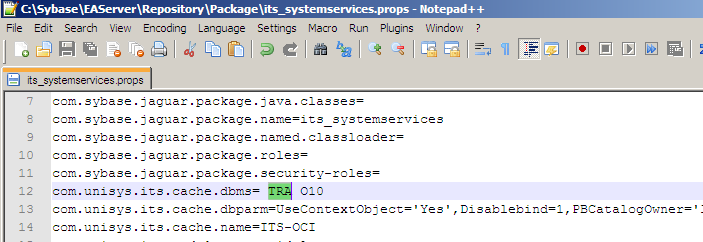
To disable, just remove TRA and restart EA Server.
DB Trace File
By default, the trace output will be stored in a file called, dbtrace.log in C:\Windows. It has lots of valuable information including the SQLs that were executed. To capture all the SQLs from a PB screen in our application, I run EA Server in local mode and thus I will be able to capture SQLs from all the Server components.
PB appends to this file for every DB call and thus file becomes fairly large quickly. Do not forget to turn off this setting as soon as you got the trace needed, as the trace files are typically large. The file can be deleted at any time (provided it's not locked by the app) and PB will create a new file (If TRA option is still set).
DB Trace file name, location and what is being captured can be controlled. Previously, you can control the trace file name and location by setting it in PB.ini. With newer versions of PB (since PB 10.2), you can edit the registry to do this. For e.g., in PB 10.5, the following registry entry controls DB Trace.
Apart from being able to change file name and location, you can also turn tracing on/off dynamically using these settings. We can also control how much trace information is captured by setting appropriate trace settings under DBTrace in the registry.
Veteran PB developer, Bruce Armstrong, has an article on this nice feature here.
Note: This setting is only for capturing SQLs coming from PB objects (Datawindows, Embedded SQL etc) Obviously, SQLs in Database (such as those in Stored procedures etc) will not be in this trace file, but the calls to Stored procedures will be.
Powerbuilder has a nice feature to enable trace on a database connection. In a typical PB application this can be enabled by adding a "TRA" (for TRACE) before the DBMS name while setting connection parameters before making connection to the database.
SQLCA.DBMS = "TRACE DBMS_name"
 SQLCA.ServerName="<Oracle Server>"
 SQLCA.LogPass="<Oracle ID>"
 SQLCA.LogPass=<Oracle Password>"
Trace can be abbreviated as TRA. In this example, the prefixing is done in Powerscript. SQLCA is the transaction object that is used in Powerscript to connect to database. In a typical application, however, these settings are read from an ini file or the Windows Registry. So depending on the design, you may have to add TRA to an .ini file or the Registry setting for the Application.
To disable the Trace, just remove TRA and restart application.
Enabling DB Trace in EA Server
I currently work with an n-tier PB application deployed in EA Server. The database connection happens only on the Server side. (It's still in PB code, but the PB code runs inside EA Server). So, it is slightly different from the traditional 2-tier PB application.
Typically in any EA Server application, connections to the database are made through Connection Caches (DB Pool). So, we can set the DB trace while connecting to the Connection Cache.
In our application, we have a package called its_systemservices that has some global service objects, including a Properties Manager component. We use this component to store and get all the system level settings, including the settings required by the connection Cache(s). The actual settings are stored as properties of the its_systemservices package. One of these settings is the DBMS property which is set to O10 (for Oracle 10g driver). By prefixing this with TRA(ce), we can enable the DB Trace.
In EA Server, every entity has a set of properties which are stored in a properties file for the entity. We can edit these properties in Jaguar Manager.
The above change gets saved in the properties file for the package (its_systemservices.props). Alternatively, you can also edit the file directly. But, be careful not to change any other settings.
To disable, just remove TRA and restart EA Server.
DB Trace File
By default, the trace output will be stored in a file called, dbtrace.log in C:\Windows. It has lots of valuable information including the SQLs that were executed. To capture all the SQLs from a PB screen in our application, I run EA Server in local mode and thus I will be able to capture SQLs from all the Server components.
PB appends to this file for every DB call and thus file becomes fairly large quickly. Do not forget to turn off this setting as soon as you got the trace needed, as the trace files are typically large. The file can be deleted at any time (provided it's not locked by the app) and PB will create a new file (If TRA option is still set).
DB Trace file name, location and what is being captured can be controlled. Previously, you can control the trace file name and location by setting it in PB.ini. With newer versions of PB (since PB 10.2), you can edit the registry to do this. For e.g., in PB 10.5, the following registry entry controls DB Trace.
HKEY_CURRENT_USER\Software\Sybase\PowerBuilder\10.5\DBTrace
Apart from being able to change file name and location, you can also turn tracing on/off dynamically using these settings. We can also control how much trace information is captured by setting appropriate trace settings under DBTrace in the registry.
Veteran PB developer, Bruce Armstrong, has an article on this nice feature here.
Note: This setting is only for capturing SQLs coming from PB objects (Datawindows, Embedded SQL etc) Obviously, SQLs in Database (such as those in Stored procedures etc) will not be in this trace file, but the calls to Stored procedures will be.
PB Gotcha - Embedded (inline) SQL - SELECT..INTO
Just a quick gotcha I stumbled on in PB code. This is about SELECT..INTO. As you know, SELECT..INTO expects one row and it works well as long as there is only one row.While researching another issue, I saw the below SQL in one of the objects in our application. of_get_cutoffdate .... // Date ld_CutOff.... SELECT TO_DATE ( PARM_VALUE , 'DD-MON' ) INTO :ld_Cutoff FROM SYSPARM WHERE TRIM ( PARM_NAME ) ='CUTOFF_DATE'; .... There are 4 rows for this parameter in the SYSPARM table. I originally anticipated ld_Cutoff to be NULL (or 01/01/1900 - default for date) as I thought this SQL will error out because of too many rows. To my surprise, the variable had the value from the first row. The gotcha here is that PB does not throw any exception when a DB error occurs. Even though the above SQL resulted in an error, PB silently fetches the first row's value into the variable and sets SQLCODE to -1 and error message in SQLErrText. (See attachment). Even though the host variable got value from 1st row, this is not guaranteed and is not a documented feature in PB or Oracle. If we anticipate more than 1 row for the SELECT, then try to add conditions (rownum, cursors) to filter to 1 row. (Oracle SQL[PL/SQL] behavior: In Oracle the same SQL would generate a TOO_MANY_ROWS exception . There also the SQL seems to be setting the host variable with the value from the 1st row, but Oracle does not recommend relying on this. See usage notes in reference 1 below) Irrespective of the # of rows fetched, we always need to add proper error checks around the SQL. In PB, check the SQLCA.SQLCode, and print messages using SQLCA.SQLErrText. (In Oracle, handle TOO_MANY_ROWS exception). Note: A lot of our SQLs getting SYSPARM are done this way. PR4297 was created to add corrections to these. Reference: 1. Oracle PL/SQL User Guide |
Visual Expert survey on Powerbuilder
If you are interested in knowing where PB stands out there, there is a survey on PB here:
http://www.visual-expert.com/EN/survey-pb-stored-procedure-sybase-mssql/survey-powerbuilder-2011-us.php
This is the company that makes Visual Expert for PB, we saw earlier. If you take the survey, they let you see their survey results for previous years.
http://www.visual-expert.com/EN/survey-pb-stored-procedure-sybase-mssql/survey-powerbuilder-2011-us.php
This is the company that makes Visual Expert for PB, we saw earlier. If you take the survey, they let you see their survey results for previous years.
Sunday, July 24, 2011
PB 101 - Contd... Project Workspace
As mentioned earlier, PB is geared up for developing applications for various platforms. We saw how the IDE is built around the Project Workspace, and the tools it provides to access every in the workspace. First let's define the various parts of a Powerbuilder based software development project.
PB 101 - Contd... Powerbuilder IDE
Powerbuilder IDE
PB IDE, just like any other windows application is an MDI application. It is made up of several windows and menus and toolbars. When you open the IDE, it opens up with no Workspace. You need to create/open a Workspace (using options in File menu) to work on a specific project. A Workspace wraps around one or more Targets which in turn includes one or more Libraries. The libraries contain the objects. The objects themselves have properties and methods like in any Object oriented environment. The objects also contain events as Powerbuilder is an event driven programming environment.
Navigation through the project hierarchy is available through a tool called System Tree. The IDE also contains a full menu toolbar called Powerbar that lets you perform several tasks including creating various components in the project hierarchy. The IDE is made up of several individual tools and wizards, which are called Painters. There is a painter for each type of object and each task in PB.
System Tree & Powerbar
The System Tree is a project explorer. This let's you see the project hierarchy mentioned above, in a tree like fashion. The TreeView object fits this hierarchical structure perfectly. The topmost parent in the tree is the Project Workspace. You can drill down targets and libraries to object properties and methods here. You can expand or collapse at any level in the tree. You can open any existing objects in the System Tree (by double-clicking on them).
Powerbar is the Powerbuilder menu Toolbar containing buttons for important menu items. You can create new objects by Clicking on the "New" button in Powerbar (or File->New option in the menu).
Clicking on New opens up a pop-up window that has several options (buttons) to open various wizards and tools in PB. You can create workspace, target, PB objects including windows, menus, datawindows from here. You can also open up several tools and wizards, such as Library explorer, Database wizard, File Editor, PB Profiler etc, by creating "New" instances of these. Every such wizard or tool in PB is called a Painter.
[caption id="attachment_139" align="aligncenter" width="1024" caption="Powerbuilder System Tree and Powerbar"] [/caption]
Fig 1 - Powerbuilder System Tree & Powerbar
Fig 2- New Option in Powerbar leads to "New" options Pop-up
Painters
As mentioned above Powerbuilder IDE is essentially made of several Painters. Each specific component type has it's own Painter (Object Editor) and several tasks have associated Painters (Tools or Wizards). So you will see Window Painter, Datawindow Painter, Database Painter, Library Painter etc. Each Painter is self-contained unit and has it's own menu (and toolbar), a control(s) list and properties sheet. As you can see, Powerbuilder IDE itself is designed in an object oriented way.
You open the individual component painters when you open an object in System Tree View or when Click on New on he menu bar. Several task and tool painters can be opened in Powerbar.
Here are some of the Painters are available in PB:
PB IDE - Other parts
Apart from these, the IDE UI has the following components:
An Output (child) Window which shows all the messages from the PB IDE environment, such as compiler outout, error messages etc.
A To-Do List Popup - Here you can enter a "todo" list. You can enter your own laundry list of things to be done in a project. Some of the wizards in PB also create To-Do entries automatically.
PB IDE includes a Browser window, which lists out all the objects in the project. This tool is very useful in locating objects in a large project with lot of libraries. As of version 10.5, it does not have a search capability yet, but you can navigate through libraries and types of objects to easily locate an object. Once found, you can "Edit" the object.
There are also several tools and wizards available in PB. Application Profiler, Debug Window, Database Painter, EA Server Profile etc. Each of these have special Toolbars attached to them.
See below link for more information (The link is for PB 11.0, but still applicable to any version > 8.x in general).
http://infocenter.sybase.com/help/index.jsp?topic=/com.sybase.dc37772_1100/html/pbgs/CBBCHDJG.htm
PB IDE, just like any other windows application is an MDI application. It is made up of several windows and menus and toolbars. When you open the IDE, it opens up with no Workspace. You need to create/open a Workspace (using options in File menu) to work on a specific project. A Workspace wraps around one or more Targets which in turn includes one or more Libraries. The libraries contain the objects. The objects themselves have properties and methods like in any Object oriented environment. The objects also contain events as Powerbuilder is an event driven programming environment.
Navigation through the project hierarchy is available through a tool called System Tree. The IDE also contains a full menu toolbar called Powerbar that lets you perform several tasks including creating various components in the project hierarchy. The IDE is made up of several individual tools and wizards, which are called Painters. There is a painter for each type of object and each task in PB.
System Tree & Powerbar
The System Tree is a project explorer. This let's you see the project hierarchy mentioned above, in a tree like fashion. The TreeView object fits this hierarchical structure perfectly. The topmost parent in the tree is the Project Workspace. You can drill down targets and libraries to object properties and methods here. You can expand or collapse at any level in the tree. You can open any existing objects in the System Tree (by double-clicking on them).
Powerbar is the Powerbuilder menu Toolbar containing buttons for important menu items. You can create new objects by Clicking on the "New" button in Powerbar (or File->New option in the menu).
Clicking on New opens up a pop-up window that has several options (buttons) to open various wizards and tools in PB. You can create workspace, target, PB objects including windows, menus, datawindows from here. You can also open up several tools and wizards, such as Library explorer, Database wizard, File Editor, PB Profiler etc, by creating "New" instances of these. Every such wizard or tool in PB is called a Painter.
[caption id="attachment_139" align="aligncenter" width="1024" caption="Powerbuilder System Tree and Powerbar"]
[/caption]Fig 1 - Powerbuilder System Tree & Powerbar

- PB New Options - Here showing several types of PB Objects
Fig 2- New Option in Powerbar leads to "New" options Pop-up
Painters
As mentioned above Powerbuilder IDE is essentially made of several Painters. Each specific component type has it's own Painter (Object Editor) and several tasks have associated Painters (Tools or Wizards). So you will see Window Painter, Datawindow Painter, Database Painter, Library Painter etc. Each Painter is self-contained unit and has it's own menu (and toolbar), a control(s) list and properties sheet. As you can see, Powerbuilder IDE itself is designed in an object oriented way.
You open the individual component painters when you open an object in System Tree View or when Click on New on he menu bar. Several task and tool painters can be opened in Powerbar.
Here are some of the Painters are available in PB:
- Application Painter
- Window Painter
- Menu Painter
- DataWindow Painter
- Function Painter
- User Object Painter
- Database Painter
- Library Painter
- Project Painter (this is used to build applications - sort of compiler/linker options window; more about this later).
PB IDE - Other parts
Apart from these, the IDE UI has the following components:
An Output (child) Window which shows all the messages from the PB IDE environment, such as compiler outout, error messages etc.
A To-Do List Popup - Here you can enter a "todo" list. You can enter your own laundry list of things to be done in a project. Some of the wizards in PB also create To-Do entries automatically.
PB IDE includes a Browser window, which lists out all the objects in the project. This tool is very useful in locating objects in a large project with lot of libraries. As of version 10.5, it does not have a search capability yet, but you can navigate through libraries and types of objects to easily locate an object. Once found, you can "Edit" the object.
There are also several tools and wizards available in PB. Application Profiler, Debug Window, Database Painter, EA Server Profile etc. Each of these have special Toolbars attached to them.
See below link for more information (The link is for PB 11.0, but still applicable to any version > 8.x in general).
http://infocenter.sybase.com/help/index.jsp?topic=/com.sybase.dc37772_1100/html/pbgs/CBBCHDJG.htm
Thursday, March 10, 2011
TomCat + Sybase EA Server
Today another coworker of mine was trying to get XAMPP setup work with our EA Server. (We have PB application and Java objects deployed to this EA Server). He has a complete setup of XAMPP with Apache and Tomcat. He has a JSP page that uses the PB objects. This got to a point and crashed with "class not found" error. Clearly pointing to a classpath issue. But which one?
He mentioned that he had to set the EA Server first before he started XAMPP. Clearly there are some conflicts in the classes shared between the 2. EA Server is normally started using a batch file that reads the env classpath (windows settings in control panel) and adds its own classpaths locally. (SET LOCAL inside batch file). So whatever EA Server set is not visible to XAMPP but not the other way around. That's why he had to start EA Server first.
We then looked for the specific class that was "not found". This happened to a stub for the PB objects. In Jaguar manager (aka Sybase Central, EA Server admin) there is an option to generate stubs (and skeletons if needed). This typically points to SYBASEEASERVERHTMLCLASSES directory. We found out that he also similar classes in SYBASEEASERVERJAVACLASSES directory. We knew these were not used, as they were not in the class path. Then we searched for classes or jar files with similar names. We stumbled on a jar file that contains part of these stubs, inside XAMPP. (He uses OpenBD for coldfusion applications, which is why he has XAMPP in the first place). This jar was old and had part of the stubs classes and did not have the one we were having trouble with.
Apparently Tomcat was automatically loading this jar (Anything inside the lib directory gets loaded automatically). We found that when we tried to rename the file.
Now that we found out the classes in trouble, we thought we could just add the class paths needed to the environment classpath and hope Tomcat would pick it up. This did not happen. On the web, I saw a note about how Tomcat handles classpaths differently than regular Java. There was a suggestion to the classpath to the batch file that starts Tomcat. We didn't try that yet.
For now, we decided to copy the classes to the library folder, so Tomcat can automatically load the classes. So, we shut down XAMPP, regenerated the jar file (in EA Server stub generation, there is an option to generate a jar instead of class files) and copied to XAMPP lib folder and everything worked OK.
He mentioned that he had to set the EA Server first before he started XAMPP. Clearly there are some conflicts in the classes shared between the 2. EA Server is normally started using a batch file that reads the env classpath (windows settings in control panel) and adds its own classpaths locally. (SET LOCAL inside batch file). So whatever EA Server set is not visible to XAMPP but not the other way around. That's why he had to start EA Server first.
We then looked for the specific class that was "not found". This happened to a stub for the PB objects. In Jaguar manager (aka Sybase Central, EA Server admin) there is an option to generate stubs (and skeletons if needed). This typically points to SYBASEEASERVERHTMLCLASSES directory. We found out that he also similar classes in SYBASEEASERVERJAVACLASSES directory. We knew these were not used, as they were not in the class path. Then we searched for classes or jar files with similar names. We stumbled on a jar file that contains part of these stubs, inside XAMPP. (He uses OpenBD for coldfusion applications, which is why he has XAMPP in the first place). This jar was old and had part of the stubs classes and did not have the one we were having trouble with.
Apparently Tomcat was automatically loading this jar (Anything inside the lib directory gets loaded automatically). We found that when we tried to rename the file.
Now that we found out the classes in trouble, we thought we could just add the class paths needed to the environment classpath and hope Tomcat would pick it up. This did not happen. On the web, I saw a note about how Tomcat handles classpaths differently than regular Java. There was a suggestion to the classpath to the batch file that starts Tomcat. We didn't try that yet.
For now, we decided to copy the classes to the library folder, so Tomcat can automatically load the classes. So, we shut down XAMPP, regenerated the jar file (in EA Server stub generation, there is an option to generate a jar instead of class files) and copied to XAMPP lib folder and everything worked OK.
Monday, November 22, 2010
Script: PB backup – Using PB ORCA to export PBLs
A basic Operating system level unit in Powerbuilder is a library file (.PBL). Each PBL file is a self contained directory in itself, with the objects stored inside in a proprietary binary format. You need Powerbuilder to view and work with this directory structure (System tree, Library painter etc).
Sometimes, it would be nice to be able to work with individual objects as text files at the OS level. This will enable us to use any text utilities to work with the objects as files (like you would a Java or C++ file). For e.g., I have a Perl script to grep through the exported text files. With text files, you can store away these source files in any version control systems (PVCS, SVN etc) easily. And you can easily diff 2 versions of an object by using any text diff tool (Of course, there are tools available to do these from inside PB, but it's just lot easier to work text files). PB allows the source code to be exported to text files with extensions, *.sr? (.srw for windows, .srd for datawindows etc.).
PB ORCA is an API that Powersoft developed early on for 3rd Party CASE tool vendors to work with PB objects. With PB ORCA, you can write programs to work PB libraries and objects from OS command line. Several object level operations available in PB IDE are also available in this API. Incidentally, there is a command line utility available with the same name (pborca.exe) on Google Code. The tool has several commands that correspond to API functions. You can create a ORCA script file (with .orc extension) and run it in batch mode using the tool. See here for a complete list of commands supported by the tool.
Below script uses pborca.exe in a DOS batch file to export all the objects in all the PBLs in a project directory to a corresponding directory structure. The batch file first loops on a list of .pbl files in a directory (passed in), and creates an ORCA script (latax.orc) with export commands. Then it runs the generated ORCA script using pborca.exe to export the object files (.*sr?). When the script finishes, you will have directory with several sub-directories, one for each PBL file exported.
This script uses several advanced features (%~ modifiers, ENABLEDELAYEDEXPANSION) of DOS Batch file. DOS scripts do several things a Unix script does, but it’s almost like an after thought! More on these later.
I use this script for daily backup of my development environment. Often times only a handful of files change on the developer's PC. Once I export the PBLs to a directory, I can diff 2 different versions using a diff tool. (I use Winmerge). The files can be optionally zipped up as well.
Pborca.exe can also handle the reverse (known as bootstrapping). Exported PB object files are only useful for performing file level operations. To be useful in a PB application, they will have to be imported back in to a PBL file again which can then be opened inside Powerbuilder. As of version 9, PB ORCA can be used to bootstrap as well. See here for the idea.
Sometimes, it would be nice to be able to work with individual objects as text files at the OS level. This will enable us to use any text utilities to work with the objects as files (like you would a Java or C++ file). For e.g., I have a Perl script to grep through the exported text files. With text files, you can store away these source files in any version control systems (PVCS, SVN etc) easily. And you can easily diff 2 versions of an object by using any text diff tool (Of course, there are tools available to do these from inside PB, but it's just lot easier to work text files). PB allows the source code to be exported to text files with extensions, *.sr? (.srw for windows, .srd for datawindows etc.).
PB ORCA is an API that Powersoft developed early on for 3rd Party CASE tool vendors to work with PB objects. With PB ORCA, you can write programs to work PB libraries and objects from OS command line. Several object level operations available in PB IDE are also available in this API. Incidentally, there is a command line utility available with the same name (pborca.exe) on Google Code. The tool has several commands that correspond to API functions. You can create a ORCA script file (with .orc extension) and run it in batch mode using the tool. See here for a complete list of commands supported by the tool.
Below script uses pborca.exe in a DOS batch file to export all the objects in all the PBLs in a project directory to a corresponding directory structure. The batch file first loops on a list of .pbl files in a directory (passed in), and creates an ORCA script (latax.orc) with export commands. Then it runs the generated ORCA script using pborca.exe to export the object files (.*sr?). When the script finishes, you will have directory with several sub-directories, one for each PBL file exported.
This script uses several advanced features (%~ modifiers, ENABLEDELAYEDEXPANSION) of DOS Batch file. DOS scripts do several things a Unix script does, but it’s almost like an after thought! More on these later.
I use this script for daily backup of my development environment. Often times only a handful of files change on the developer's PC. Once I export the PBLs to a directory, I can diff 2 different versions using a diff tool. (I use Winmerge). The files can be optionally zipped up as well.
Pborca.exe can also handle the reverse (known as bootstrapping). Exported PB object files are only useful for performing file level operations. To be useful in a PB application, they will have to be imported back in to a PBL file again which can then be opened inside Powerbuilder. As of version 9, PB ORCA can be used to bootstrap as well. See here for the idea.
REM 12,2009 Sam V
REM script to export PBLS using pborca.exe (ORCA interface to PB)
REM this copies all the folders from source (typically Z:) to target.
REM then it creates an ORCA script to export each pbl to the subdirectories.
REM Finally it runs the generated orca script in pborca
REM @echo off

echo %0 %1, %2
@REM copy all the directories from the powerbuilder root to the export directory
@REM if a x.PBL is already in x subdirectory, you may not need MKD1 below.

@echo creating the target directory; just copy the entire path with empty sub-directories
xcopy /t /e /I %1 %2

@REM Here we start generating the orca file to be used with <a href="http://pborca.googlecode.com/svn/trunk/install/deploy/pborca.htm">PBORCA</a>.
@echo session begin pborc100.dll > latax.orc

@echo off
@SETLOCAL ENABLEDELAYEDEXPANSION
@FOR /f "usebackq delims=" %%a IN (`dir /s /b %1*.pbl`) DO (
@set a1=%%~dpa
@REM echo a1=%a1%
@call set "a1=!a1:%~1=%~2!"
@REM MKD1
@REM This creates a sub-directory with the same name as PBL file
mkdir "!a1!"
@echo export %%~fa,,,!a1! >> latax.orc)

@echo session end >> latax.orc

@ENDLOCAL

@echo on
@echo run the script in pborca
pborca latax.orc

REM end of script
Thursday, November 11, 2010
More about PB from my Hello World post
In my earlier post, I wrote a very simple program in Powerbuilder (PB) to print/show Hello World. I tried to compare with many other programming languages there. In that post, there were several concepts introduced. But, being a simple post, I ignored most of the details. We will try to analyze the details here and this way explain what it means to program in PB.
From that list of examples I had, there is one thing that stands out. PB looks a lot more like C/C++/Java, at least in commenting style. But, then we see it has the simplicity of Basic program that it's usually thought of as originating from. It also has a lot of similarities with Visual Basic (For that matter with other flavors of BASIC such Power basic as well). PB is actually the tool and it uses proprietary language called PowerScript. Like BASIC this is an interpreted language, but not interactive (In a BASIC interpreter, results were displayed as soon as you type a command (or a command block) and press ENTER.). In PB, though the code is interpreted, it's not the original code that you typed in, but an intermediate code it generated when you compiled (generated) or ran. More on this below.
PB is at the very least, an Object based language. Windows environment contains windows with several controls or widgets on each window. The various controls and windows (objects) talk to each other through events and methods (functions). Now, this itself doesn't make it object oriented, but definitely object based. In PB (as in VB) an application is made up of several objects such as Application, Windows, Buttons, Text Boxes (and Data windows - more on this later). You cannot have a program without an application and you cannot communicate with the users without windows or buttons. So essentially when we build a PB application, we are reusing these "objects" as templates to make our own objects. Thus, by the very nature PB is Object based.
Real Object orientation came to it in later versions. A rudimentary "user object " was introduced as early as ver 3.0 and by Ver 5.0 Pb introduced Object-oriented concepts such as function overloading. Many of us still write object based code in PB, but there have been some movements to make it more and more object oriented. There were several frameworks developed for PBincluding PFC, which is still strong in the Client/Server world. A more sophisticated EAF was developed for PB in an enterprise n-tier world. A lot more companies seem to be dusting off their old PB programs and try to upgrade latest versions of PB. So, as a developer you will see both object-based and object-oriented code out there. This is different from Java perspective which is Object Oriented to the core, but not unlike C++ where people continue(d) to code C style programs.
When we did the hello world, we mentioned what we coded and what we saw. But, we did not mention how or where we coded it. A Java program can be coded in a simple text editor like Notepad or more sophisticated Eclipse or Netbeans. It can then compiled and executed in a DOS (or unix/linux) command line. Or like in Eclipse, all these functionality can be done in one tool. Such tools are called IDE - Integrated Development Environment. PB has been IDE from the beginning. In fact, you cannot code or compile PB outside Powerbuilder (not exactly true, particularly the compiling part). Unlike other tools, PB is a more complete IDE and allows you, as a developer, to debug and run from within itself. Also, the code that you put into PB is actually stored in files with the extension .pbl in proprietary format. More on these later.
[caption id="attachment_95" align="alignnone" width="300" caption="Powerbuilder Workspace"] [/caption]
What is not revealed in the Hello World program is what kind of programs can be written in PB. Apart from the windows programs, PB can also be a great Client/Server tool. In fact, in corporate environments it is mostly used as a Database programming tool. It's strength lies wholly on the simplicity of database connectivity with the use of Datawindows. With the advent of EA Server, PB can be a great n-tier development tool as well, like Java J2EE. (More on these later).
As mentioned above, PB runs in an interpreted mode. When you compile a PB program, it gets compiled into p-code, a proprietary bytecode. In this regard PB is very much like Java. Just like Java, there are options to compile into native machine code, but typically p-code is preferred. Thus, to run a PB application, you need to install a PB runtime. This is very much like a Java VM. (In fact in EA Server terminology, this is called PB VM). So, theoretically, PB application can be ported and run anywhere PB runtime was available. There were Unix versions of PB available. But, you need a specific version of PB runtime to run a program generated with a specific version of PB. Here it is different from Java, where future runtimes are guaranteed to be backward compatible and thus can run older versions of Java classes.This makes PB less portable. Also, by the windowing nature of it, it naturally fits into Microsoft Windows. The direction Sybase is taking, seems to confirms this. PB12 is, apart from being a windows application builder, also an IDE for .Net plaform.
Starting from my next post, I will go into more details about using the product.
Interpreted or Compiled
From that list of examples I had, there is one thing that stands out. PB looks a lot more like C/C++/Java, at least in commenting style. But, then we see it has the simplicity of Basic program that it's usually thought of as originating from. It also has a lot of similarities with Visual Basic (For that matter with other flavors of BASIC such Power basic as well). PB is actually the tool and it uses proprietary language called PowerScript. Like BASIC this is an interpreted language, but not interactive (In a BASIC interpreter, results were displayed as soon as you type a command (or a command block) and press ENTER.). In PB, though the code is interpreted, it's not the original code that you typed in, but an intermediate code it generated when you compiled (generated) or ran. More on this below.
Object Orientedness:
PB is at the very least, an Object based language. Windows environment contains windows with several controls or widgets on each window. The various controls and windows (objects) talk to each other through events and methods (functions). Now, this itself doesn't make it object oriented, but definitely object based. In PB (as in VB) an application is made up of several objects such as Application, Windows, Buttons, Text Boxes (and Data windows - more on this later). You cannot have a program without an application and you cannot communicate with the users without windows or buttons. So essentially when we build a PB application, we are reusing these "objects" as templates to make our own objects. Thus, by the very nature PB is Object based.
Real Object orientation came to it in later versions. A rudimentary "user object " was introduced as early as ver 3.0 and by Ver 5.0 Pb introduced Object-oriented concepts such as function overloading. Many of us still write object based code in PB, but there have been some movements to make it more and more object oriented. There were several frameworks developed for PBincluding PFC, which is still strong in the Client/Server world. A more sophisticated EAF was developed for PB in an enterprise n-tier world. A lot more companies seem to be dusting off their old PB programs and try to upgrade latest versions of PB. So, as a developer you will see both object-based and object-oriented code out there. This is different from Java perspective which is Object Oriented to the core, but not unlike C++ where people continue(d) to code C style programs.
User Interface (IDE)
When we did the hello world, we mentioned what we coded and what we saw. But, we did not mention how or where we coded it. A Java program can be coded in a simple text editor like Notepad or more sophisticated Eclipse or Netbeans. It can then compiled and executed in a DOS (or unix/linux) command line. Or like in Eclipse, all these functionality can be done in one tool. Such tools are called IDE - Integrated Development Environment. PB has been IDE from the beginning. In fact, you cannot code or compile PB outside Powerbuilder (not exactly true, particularly the compiling part). Unlike other tools, PB is a more complete IDE and allows you, as a developer, to debug and run from within itself. Also, the code that you put into PB is actually stored in files with the extension .pbl in proprietary format. More on these later.
[caption id="attachment_95" align="alignnone" width="300" caption="Powerbuilder Workspace"]
 [/caption]
Types of Applications built in PB
What is not revealed in the Hello World program is what kind of programs can be written in PB. Apart from the windows programs, PB can also be a great Client/Server tool. In fact, in corporate environments it is mostly used as a Database programming tool. It's strength lies wholly on the simplicity of database connectivity with the use of Datawindows. With the advent of EA Server, PB can be a great n-tier development tool as well, like Java J2EE. (More on these later).
PB portability
As mentioned above, PB runs in an interpreted mode. When you compile a PB program, it gets compiled into p-code, a proprietary bytecode. In this regard PB is very much like Java. Just like Java, there are options to compile into native machine code, but typically p-code is preferred. Thus, to run a PB application, you need to install a PB runtime. This is very much like a Java VM. (In fact in EA Server terminology, this is called PB VM). So, theoretically, PB application can be ported and run anywhere PB runtime was available. There were Unix versions of PB available. But, you need a specific version of PB runtime to run a program generated with a specific version of PB. Here it is different from Java, where future runtimes are guaranteed to be backward compatible and thus can run older versions of Java classes.This makes PB less portable. Also, by the windowing nature of it, it naturally fits into Microsoft Windows. The direction Sybase is taking, seems to confirms this. PB12 is, apart from being a windows application builder, also an IDE for .Net plaform.
Starting from my next post, I will go into more details about using the product.
History of PB
Powerbuilder grew from the modest beginnings in the early 80's to where it is now. Those of us who have worked with it for a long time know that it's come a long way as a product. But how many of know it's real history (sort of like the history PC programming world itself)? It was originally conceived and produced by a company called Powersoft. Now it is owned by Sybase. We all knew that it was "bought out" by Sybase in the 90's and what it did to the product. But how many of us know the background of it? Both Powersoft, the company, and Powerbuilder, the product had their fair share of competitions from big giants, threat of hostile takeovers. After initial days of glory, it did lie in the dumps for some time and several wrote death sentence for it. Yet, time and again it came back up again and with PB 12 seems to have gained a new life. I can write about all those here. But, I won't try to re-invent the wheel as there have been several nice posts about the subject. I am listing a few, that I liked, here:
An Article by Chris Pollach
History of Powerbuilder from the maker of PBLPeeper
A nice blog about Powerbuilder and other tools
The displaced guy or your personal IT guy on the web!
An Article by Chris Pollach
History of Powerbuilder from the maker of PBLPeeper
A nice blog about Powerbuilder and other tools
The displaced guy or your personal IT guy on the web!
Subscribe to:
Posts
(
Atom
)